
Hey, I hit DC a couple weeks ago.
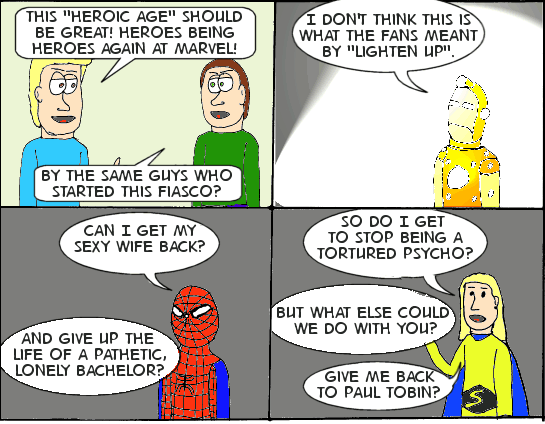
Yeah, after I did my commentary/parody of “Blackest Night” I figured why not do the same for Marvel’s “Heroic Age” announcement? I didn’t add that Sentry is also supposed to be on drugs as a power source because I figure murdering nutjob is bad enough. I’m wondering if I should have had Spidey upside down, but the body types are still close to the usual style I use for the comic, and this style doesn’t respond well to major posing, in case you hadn’t noticed. 😦
For the “Marvel” panels I didn’t go with the regular Jake & Leon style because quite frankly it wouldn’t work (much like the Masters of the Universe in #12), at least for Iron Man and Spider-Man, so Sentry gets to help with the third style I’ve been working on. I actually planned a strip set in Jake and Leon’s reality, but I figured why not do this instead and get it out of the way? At least we got #14, and I’ll try to stay in style for the next few comics–unless I have to. 🙂
For the Iron Man panel: In the preview Marvel put out for the new armor, there seem to be a lot of lights (as opposed to the glowing lines of some of the previous models) around the suit, and he’s been one of the darker-turned characters since Civil War, so playing with both circumstances made sense, and let me play with PSP’s “light” effect. That actually helped me decide what color to put the other two characters, as if they were in the same room addressing Quesada. Unintended consequences and all that.
All coloring was done on the computer. Jake is the artist, not Leon, so if Jake had been discussing his doubts, I would have used coloring pencils, like the MOTU panels in #12. I played a bit more with the layout of the lettering and word balloons, which will serve me in my later comic ideas. I used the inking pens again for the Marvel panels, but broke out my old Expresso pen for panel 1, just to compare it to the other pens for my own needs.
The real you-don’t-care part, however is in the scanning. If I try to scan a picture as “black and white” into Paint Shop Pro, the pallet will only let me use black, white, and shades of gray. I don’t know why Jasc did this, or if Corel bypassed that when they bought the company, but I usually have to scan in “color mode” and then use the color replacer to “fix” the line-art prior to coloring. This time I decided to try something different. I scanned the picture twice, once in “color” mode and once in “b&w” mode, then transferred the black and white version to the color mode as a separate layer, thus preserving the file size and getting the lines as dark as I want them to. I don’t mind playing runaround if the results are worth it. 😛
Well, that’s the longest “description” I’ve done yet for Jake & Leon.




 BW Media Spotlight
